
Why is Folgo blocked by my domain settings?
Overview
Some custom domain environments may restrict URL fetch calls, which can prevent Folgo from functioning properly. To ensure uninterrupted service and avoid common connection errors, it is essential to whitelist specific platform addresses.
Endpoints to Whitelist
To enable Folgo to make the necessary requests, your environment must allow connections to the following addresses:
https://*.firebaseio.com/https://*.google.com/https://*.googleapis.com/https://www.google-analytics.com/https://api.openai.com/https://*.uc.r.appspot.com/
Note: The asterisks (
*) serve as wildcards, meaning any subdomain is included.
Configuration Steps
Follow these steps to update your domain settings:
- Access Your Admin Console:
- Log in to your Admin Console.
- Navigate to Apps > Google Workspace > Settings for Drive and Docs > Features and Applications

-
Locate Importing and fetching from URLs
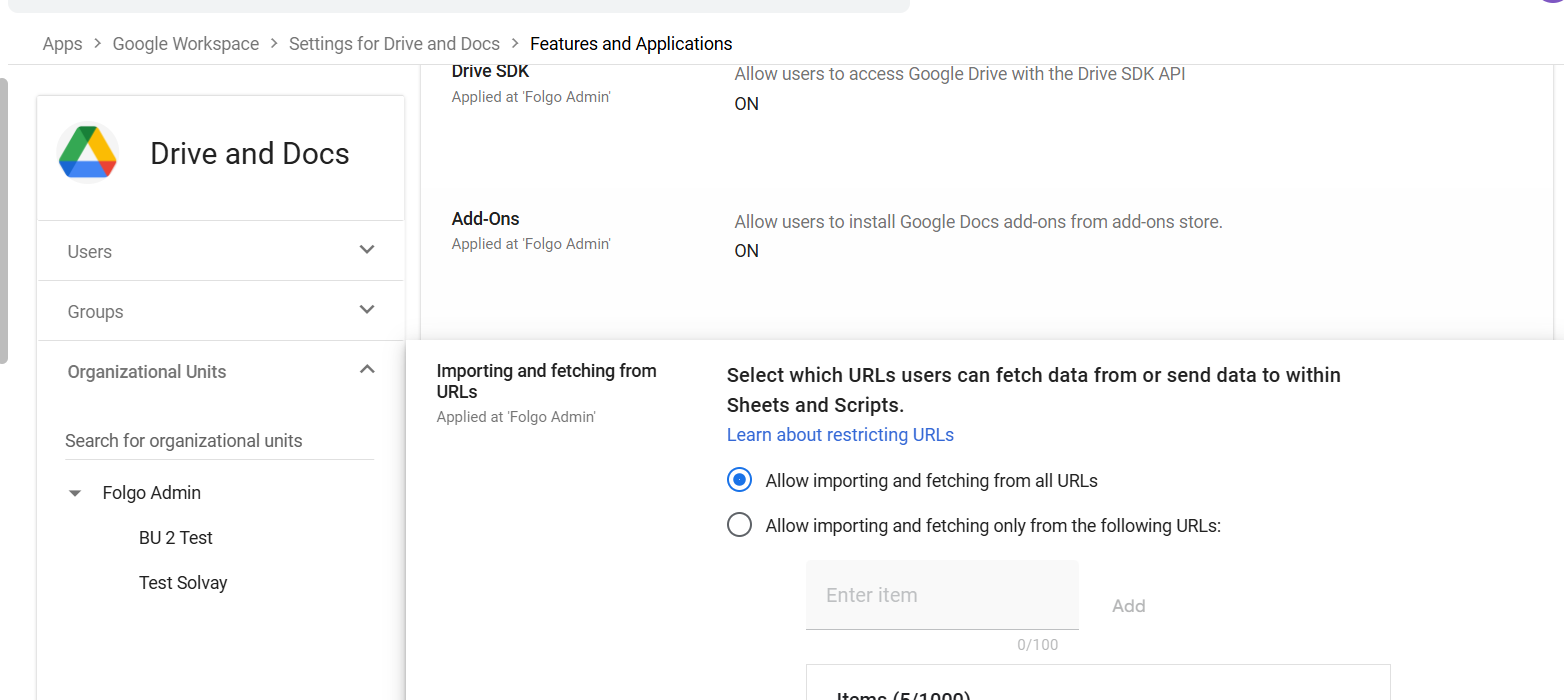
- Enter the following items in the list
| https://*.firebaseio.com/ |
| https://*.google.com/ |
| https://*.googleapis.com/ |
| https://www.google-analytics.com/ |
| https://api.openai.com/ |
| https://*.uc.r.appspot.com/ |
- Save and Apply Your Changes
Conclusion
By whitelisting these endpoints, you will prevent non-whitelisted URL fetch call errors, ensuring that Folgo operates without interruption. If you encounter any further issues or need additional support, please contact our support team.