
Use cases for Folgo's Data Extraction
Data extraction is one of Folgo’s most powerful features, helping admins and teams save time by pulling the information they need from their documents. Until now, this meant defining exactly what data you wanted, one field at a time, and applying it across your files.
With Folgo’s Gemini integration, data extraction has entered a new era. You can now extract specific, contextual data from documents of all types, contracts, invoices, HR files etc.
This new approach unlocks smarter, flexible workflows across your organization. Here’s an article showcasing some practical use cases for Folgo’s Data Extraction feature.
Use Cases
- Invoices
- Contracts
- Document Classification
How Folgo's Data Extraction works?
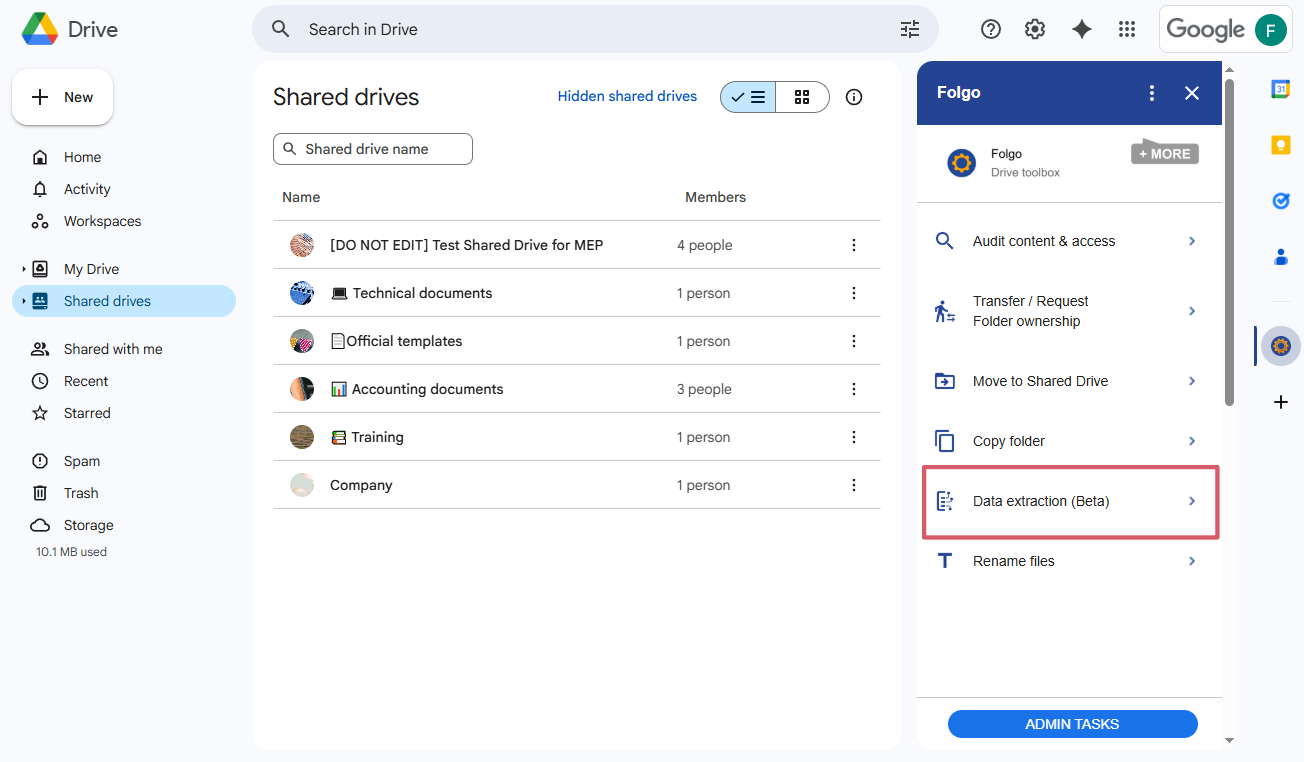
1️⃣ Go to Data extraction in Folgo.
Go on Google Drive, click on Data extraction on Folgo's side bar.
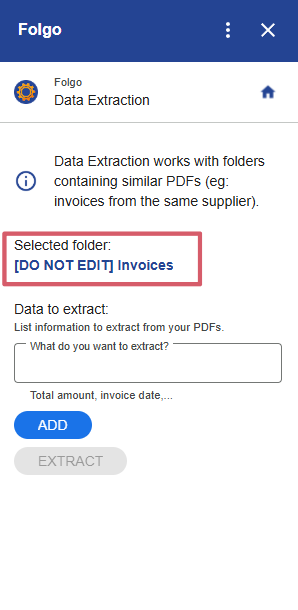
2️⃣ Select the folder containing the data you want to extract.
You select the folder where your documents are stored in Google Drive.
You can select a folder containing hundreds or thousands of documents in a single batch, and Folgo will extract exactly the data you need at scale, without manual sorting. Folgo proceeds the documents in a single batch.
3️⃣ Enter the data you want to extract.
For example, you can enter:
- “Name”
- “Date”
- "Price”
- “Addresse”
- “Phone number”
- "Email”
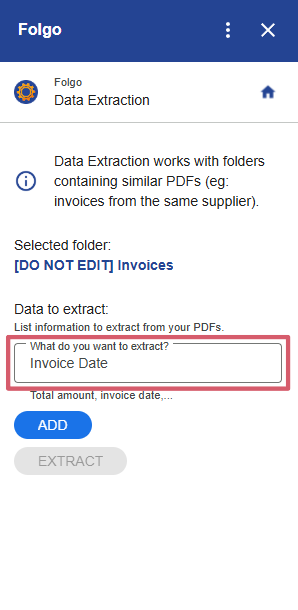
Click “Add” to include additional data points. You can add as many as you want.
4️⃣ Click on "Extract" and let Folgo process your files.
Folgo will extract the requested information across all selected documents, even if their formats differ.
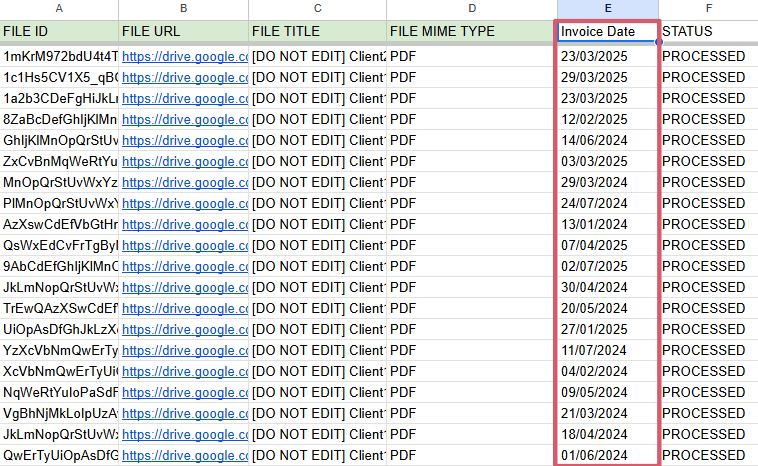
5️⃣ Review and export the extracted data.
As with other processes in Folgo, a Google Sheet will be generated listing all the files in your selected folder. Folgo will then systematically open each file, extract the specific data you need, and add it directly into your spreadsheet.
Now that you know how to set up and run a data extraction in Folgo, let’s explore some practical ways you can use this feature to save time, improve organization, and unlock insights across your documents.
1.Invoices
Organizations handling a high volume of invoices often face the challenge of quickly locating critical information such as buyer names, addresses, invoice dates, and amounts. Manually processing these files is time-consuming and prone to errors, especially when invoice formats vary widely.
With Folgo’s advanced data extraction powered by Gemini, you can extract key invoice details quickly such as:
- Buyer name
- Billing address
- Total amount
- Tax information
- Invoice date
💡 With this feature, you can easily detect anomalies or missing information to flag invoices that require follow-up.
2.Contracts
Organizations also manages a large volumes of contracts and they often need to locate specific clauses like liability caps, renewal terms, or governing law across hundreds of documents. Manually reviewing each contract is slow, inconsistent, and prone to oversight.
- Contract Management
Organizations can extract clauses to track compliance, mitigate risks, or prepare for audits, such as:
- Liability cap
- Termination conditions
- Renewal dates
- Payment terms
- Jurisdiction / governing law
- Confidentiality clauses
- Force majeure clauses
- Sensitive Data Detection (Compliance & Privacy)
To comply with data protection policies, teams may extract or detect:
- Personal Identifiable Information (PII): names, addresses, phone numbers
- Social Security Numbers or tax IDs
- Credit card or bank account details
- Health-related information
- Passport numbers
- Any sensitive keywords relevant to internal compliance policies
💡 With this feature, you can quickly identify risky clauses, missing liability caps, or sensitive data in contracts to protect your organization before signing.
3.Document Classification
Organizations often store thousands of mixed documents in Google Drive: contracts, invoices, HR forms, purchase orders, NDAs, and more. Manually sorting these files is time-consuming, especially when filenames or folder structures are unclear.
- Classify documents by type in bulk (contract, invoice, HR document, purchase order, etc.).
Since Folgo does not auto-classify yet, the Data Extraction feature acts as a keyword detection tool to enable manual classification decisions at scale. It saves time by telling you which documents contain which keywords, allowing you to sort thousands of files in a structured, data-backed manner while maintaining control over classification logic.
- Define keywords or phrases that indicate a document type (e.g., “Contract Number” or “Agreement” for contracts, “Invoice” or “Total Amount” for invoices, “HR” or “Employee Name” for HR documents).
- Add these keywords as extraction targets using the “Add” button, creating a set of indicators you want to check within your documents.
- Run the extraction across your folder.
- In the generated Google Sheet, check which documents contain which indicators. For example, if “Invoice” and “Total Amount” are detected, the file is likely an invoice; if “Agreement” and “Governing Law” are found, it is likely a contract.
💡 With this feature, quickly organize your Drive and save hours of manual sorting while keeping your Drive clean and easy to navigate.
Conclusion
Folgo’s advanced data extraction, powered by Gemini, transforms the way you handle documents in Google Drive. Whether you need to extract key details from thousands of invoices, locate specific clauses in contracts, or classify a mixed library of files, you can now do it at scale—without repetitive manual work.
By leveraging this feature, you save time, reduce errors, and unlock the insights hidden across your Drive, helping your organization stay organized and focused on what truly matters.
Want to learn more about Data Extraction? Take a look at this article.